Visual Studio: Sign Windows drivers with a driver signing certificate
After installing your certificate and creating a PFX file, you need to sign your Windows driver with your certificate. The easiest way to do this is with Visual Studio, though there are other options.
- Launch Visual Studio.
- In the Solutions Browser, right-click your
SLNorVCXPROJfile, and then select Properties.
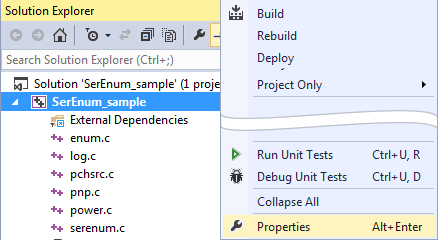
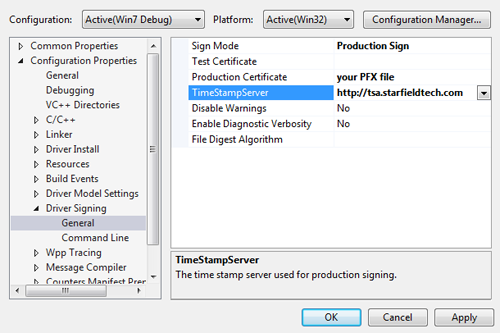
- In the menu on the left, click Driver Signing and then click General.
- Complete the following fields, and then click OK:
Field What to do... Sign Mode Select Production Sign. Production Certificate Select your PFXfile.TimeStampServer Type http://tsa.starfieldtech.com
Now when you build your driver, it will be signed using your driver signing certificate.
Next step
- Start distributing your newly signed file to your users.